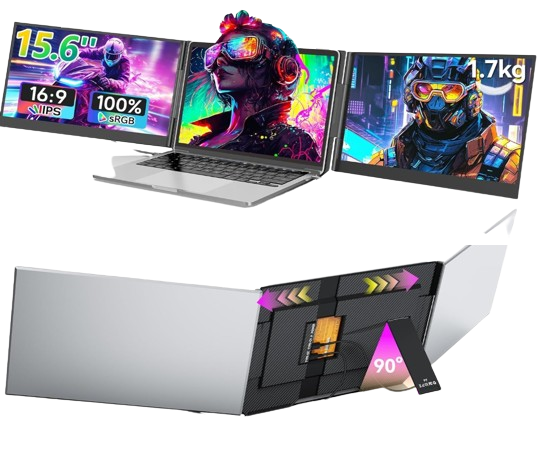
Triple Screen Laptop Extender
A triple laptop screen extender is a portable device that adds two additional screens to your laptop, transforming it into a three-screen workstation. It allows you to work on multiple tasks simultaneously without switching between tabs, improving efficiency and workflow.
This device is ideal for professionals, students, traders, and anyone who needs a larger workspace.
Why You Need a Triple Laptop Screen Extender
Working on a single laptop screen can limit productivity, especially when handling multiple applications at once. Constantly switching between tabs slows down your workflow.
A triple screen extender solves this problem by giving you three displays at the same time. You can manage emails, documents, meetings, and research all in one view, making your work faster and more organized.
Product Overview
A triple laptop screen extender typically includes two foldable side screens that attach to your laptop. Most models feature Full HD displays, adjustable angles, and plug-and-play functionality.
They are designed to be portable and lightweight, making them suitable for travel, remote work, and office use. Many models support USB-C or HDMI connectivity and are compatible with Windows, Mac, and other devices.
Key Features
Dual additional screens for triple display setup
Full HD 1080P resolution for clear visuals
Plug-and-play setup with minimal installation
Adjustable screen angles and rotation
Lightweight and portable design
Compatible with multiple operating systems
Benefits of Using a Triple Laptop Screen Extender
This device significantly improves productivity by allowing you to work across multiple screens at once. It reduces the need to switch between applications and helps you stay focused.
It also enhances multitasking, making it easier to manage different tasks such as video calls, data analysis, and content creation simultaneously.
Another benefit is portability, as you can carry your multi-screen setup anywhere without needing a full desktop system.
Who Should Use This Product
This product is suitable for:
Remote workers and freelancers
Business professionals
Students and researchers
Programmers and designers
Stock traders and analysts
Pros and Cons
Pros
Boosts productivity and efficiency
Easy to set up and use
Portable and travel-friendly
Supports multitasking
Cons
Requires compatible ports (USB-C or HDMI)
May consume additional battery power
Can add weight to your setup
How to Use a Triple Laptop Screen Extender
Attach the extender to your laptop screen. Connect it using the required cables such as USB-C or HDMI.
Adjust the screen angles and configure display settings according to your preference.
Tips for Best Results
Ensure your laptop supports multiple displays. Use a power source if needed for better performance. Adjust brightness for comfortable viewing. Use a stable surface for setup.
Final Thoughts
A triple laptop screen extender is a powerful tool for boosting productivity and improving workflow. It transforms your laptop into a complete workstation, allowing you to work smarter and faster.


Reviews
There are no reviews yet.